Microsoft Update Triggers Excel Online Errors in Dynamics 365 CRM (Feb 2026) – Quick Fix Guide
Nimus Technologies helps organisations work smarter with Microsoft solutions and effective digital marketing. Our team specialises in Dynamics 365, Power Platform, Power BI, SharePoint, Azure, and .NET. We also support business growth through SEO, social media marketing, content, PPC and reputation management, delivering real and measurable results.
Many organizations using Microsoft Dynamics 365 recently reported problems opening data in Excel Online. After a February 2026 Microsoft update, users started experiencing the Dynamics 365 Excel Online error while accessing records from CRM views.
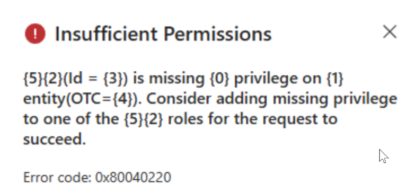
Instead of opening the spreadsheet successfully, the system may display a permission or access error. This issue primarily affects organizations using Model-Driven Apps in Dynamics 365 Customer Service and other CRM modules.
In this guide, we explain the cause of the Dynamics 365 Excel Online error, the impact of the recent Microsoft update, and the steps required to fix it quickly.

What Is the Dynamics 365 Excel Online Error?
The Dynamics 365 Excel Online error occurs when users attempt to open records using the Open in Excel Online feature within CRM.
Users typically encounter this issue when they:
Open a record view in Dynamics 365
Click Export to Excel
Select Open in Excel Online
After the recent Microsoft update, the Dynamics 365 issue, the Excel file may fail to open and display an error message related to permissions or document access.
Why the Microsoft Update Caused This Issue
The Microsoft update to Dynamics 365 introduced stricter validation for document management and Office integration permissions.
Previously, some user roles could access Excel Online even if all privileges were not properly configured. However, after the update, Dynamics 365 now strictly checks permissions before allowing Excel Online access.
If the assigned security role does not include the required privileges, the system blocks the request, resulting in the Excel Online not working in Dynamics 365.
Common Symptoms
Organizations experiencing the Dynamics 365 CRM Excel export error may notice the following problems:
Excel Online is not opening in Dynamics 365
Permission or authorization error messages
Export to Excel works, but Open in Excel Online fails
Only specific user roles experience the issue
These symptoms usually appear immediately after a system update or configuration change.
How to Fix the Dynamics 365 Excel Online Error
Administrators can resolve the Fix Excel Online error in Dynamics 365 issue by reviewing and updating security role permissions.
Step 1: Open Advanced Settings
Navigate to the settings menu within your Microsoft Dynamics 365 environment.
Step 2: Go to Security Roles
Open the following section:
Settings → Security → Security Roles
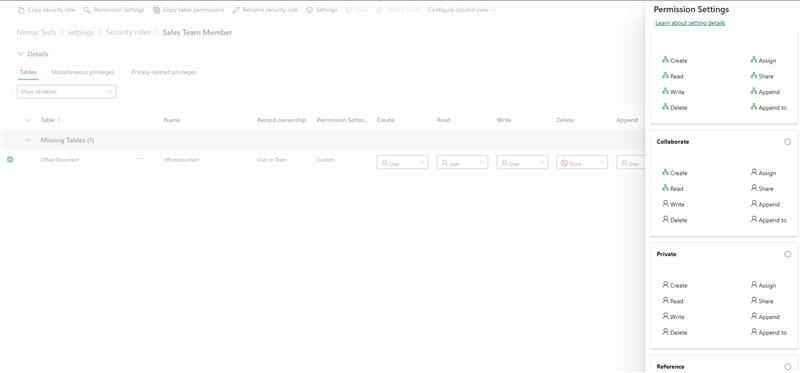
Step 3: Edit the Assigned Role
Select the role assigned to affected users and open it for editing.
Step 4: Check Business Management Permissions
Navigate to the Business Management tab and review document-related permissions.
Step 5: Enable Required Privileges
Ensure the following permissions are enabled:
Document Management access
Office integration permissions
Required read or collaboration privileges
Step 6: Save Changes and Refresh
Save the security role and refresh the system. Users should now be able to access Excel Online without errors.
Best Practices to Avoid Similar Issues
To prevent similar problems related to Microsoft update Dynamics 365 issues, organizations should follow these best practices:
Regularly review and update security role permissions
Monitor platform updates from Microsoft
Test updates in a sandbox environment before applying them to production
Following these practices can reduce disruptions and ensure smooth integration between CRM and Excel Online.
Conclusion
The recent update in Microsoft Dynamics 365 introduced stricter permission validation, which triggered the Dynamics 365 Excel Online error for many organizations.
Fortunately, the issue can usually be resolved by updating the appropriate security role privileges.
Businesses relying on CRM systems should regularly review their configurations to ensure compatibility with platform updates.
At Nimus Technologies, we help organizations optimize and manage their Microsoft Dynamics environments, ensuring smooth performance and quick resolution of technical issues.